No terminal:
1. cd /Applications/Sublime\ Text\ 2.app/Contents/MacOS/
2. Edite o arquivo ->> “vim Sublime\ Text\ 2″
3. Mude para o modo de hexadecimal ->> “:$!xxd”
4. Substitua a string ->> “:%s/5BE509C33B020111/5BE509C32B020111/g”
No terminal:
1. cd /Applications/Sublime\ Text\ 2.app/Contents/MacOS/
2. Edite o arquivo ->> “vim Sublime\ Text\ 2″
3. Mude para o modo de hexadecimal ->> “:$!xxd”
4. Substitua a string ->> “:%s/5BE509C33B020111/5BE509C32B020111/g”
Link para download: https://developer.apple.com/devcenter/download.action?path=/Developer_Tools/xcod e_3.2.6_and_ios_sdk_4.3__final/xcode_3.2.6_and_ios_sdk_4.3.dmg
Na instalação poderá aparecer uma mensagem pedindo para fechar o iTunes, vá então até o “Activity Monitor”, ou “Monitor de atividades”, como preferir, e encerre o processo “iTunesHelper”.
* Necessário que você possua o XCODE instalado, caso não tenha, baixe-o em: https://developer.apple.com/downloads/index.action?q=xcode
Abra o terminal, efetue login como root (sudo su).
Baixe o pacote SVN atualizado:
cd ~
curl -o subversion-latest.tar.gz http://apache.mirrors.tds.net/subversion/subversion-1.8.8.tar.gz
tar -xvf subversion-latest.tar.gz
Compilando:
cd ~/subversion-1.8.8/
sh get-deps.sh serf
cd ~/subversion-1.8.8/serf/
./configure
make
make install
cd ..
../configure --prefix=/usr/local --with-serf=/usr/local/serf
make
make install
Adicione ao seu .bash_profile (pico ~/.bash_profile) a seguinte linha:
export PATH=/usr/local/bin:$PATH
Reinicie o computador e teste o SVN utilizando o terminal:
svn --version
🙂
Modifique as chaves de configuração abaixo, em Opções > Preferências > Avançado
/**
 * Função para validação de CPF
 * @param String str numero do cpf para validar
 * @return true or false
 */
function validaCpf(str){
    str = str.replace('.','');
    str = str.replace('.','');
    str = str.replace('-','');
    cpf = str;
    var numeros, digitos, soma, i, resultado, digitos_iguais;
    digitos_iguais = 1;
    if (cpf.length < 11)
        return false;
    for (i = 0; i < cpf.length - 1; i++)
        if (cpf.charAt(i) != cpf.charAt(i + 1)){
            digitos_iguais = 0;
            break;
        }
    if (!digitos_iguais){
        numeros = cpf.substring(0,9);
        digitos = cpf.substring(9);
        soma = 0;
        for (i = 10; i > 1; i--)
            soma += numeros.charAt(10 - i) * i;
        resultado = soma % 11 < 2 ? 0 : 11 - soma % 11;
        if (resultado != digitos.charAt(0))
            return false;
        numeros = cpf.substring(0,10);
        soma = 0;
        for (i = 11; i > 1; i--)
            soma += numeros.charAt(11 - i) * i;
        resultado = soma % 11 < 2 ? 0 : 11 - soma % 11;
        if (resultado != digitos.charAt(1))
            return false;
        return true;
    }
    else
        return false;
}
var NovaString = StringAntiga.replace(/(<([^>]+)>)/ig,"");
Acesse o terminal, digite SU para obter permissão de root…
cd /Applications/MAMP/conf/apache

# generate a private key (will request a password twice)
openssl genrsa -des3 -out server.key 1024

# generate certificate signing request (same password as above)
openssl req -new -key server.key -out server.csr

# Answer the questions
Country Name (2 letter code) [AU]: BR
State or Province Name (full name) [Some-State]: Rio Grande do Sul
Locality Name (eg, city) []: Pelotas
Organization Name (eg, company) [Internet Widgits Pty Ltd]: 2WAY DIGITAL SOLUTIONS
Organizational Unit Name (eg, section) []: # leave this empty
Common Name (eg, YOUR name) []: # leave this empty
Email Address []: # leave this empty
A challenge password []: # leave this empty
An optional company name []: # leave this empty

# generate the certificate
openssl x509 -req -days 365 -in server.csr -signkey server.key -out server.crt

# remove the password from the server key
cp server.key server.tmp
openssl rsa -in server.tmp -out server.key
Edite o arquivo de configuração do apache (/Applications/MAMP/conf/apache/httpd.conf), e remova o comentário da seguinte linha (próximo a linha 537).
# Secure (SSL/TLS) connections
# Include /Applications/MAMP/conf/apache/extra/httpd-ssl.conf
Edite as configurações do httpd-ssl.conf (/Applications/MAMP/conf/apache/extra/httpd-vhosts.conf) para habilitar a porta 443 para localhost, deve ficar semelhante a isto:
DocumentRoot "/Users/Nataniel/Sites/"
ServerName localhost:443
ServerAdmin webmaster@localhost
ErrorLog "/Applications/MAMP/Library/logs/error_log"
TransferLog "/Applications/MAMP/Library/logs/access_log"
Senha padrão do MAMP (default password for MySQL under MAMP)
Username: root
Password: root
No vanilla a senha é em branco 😉
O telefone de atendimento do BCash está escondido no site, e somente aparece após o contato:
3004-1533 (Capitais e Regiões Metropolitanas)
(11)3075-7520 (Demais Localidades)
Horário de Atendimento:
Segunda a Sexta 7h as 22h – Sábados 9h as 15h
BOA SORTE!
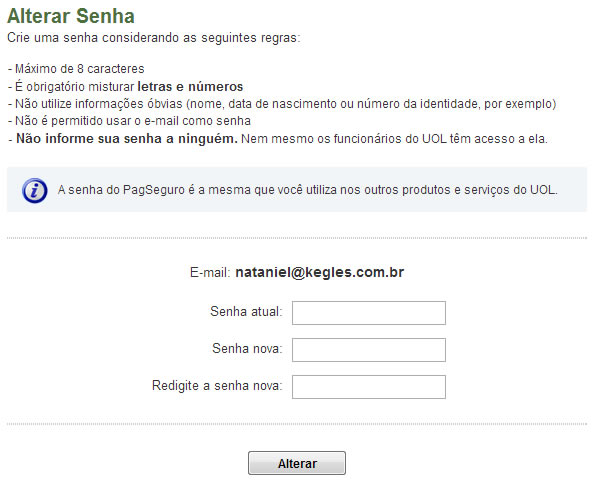
Para alterar a senha no PagSeguro UOL:
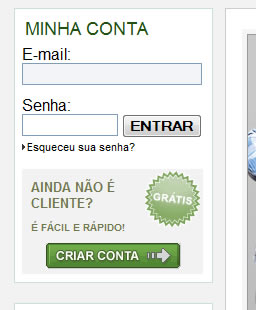
1) Entre no site com seu e-mail e senha.
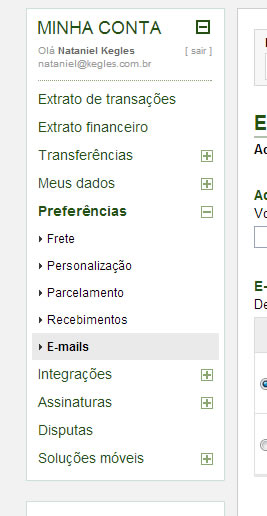
2) Clique em Preferências -> E-mails
3) Clique em alterar senha, selecione o e-mail que deseja alterar a senha.
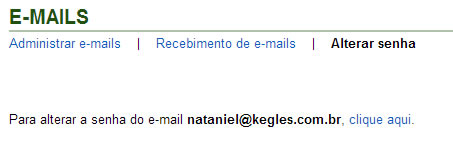
4) Digite sua senha antiga e sua nova senha, confirmando-a em seguida.
That’s all folks! 😉